


Vegas Casino (Vegas UA) login and sign-up: KYC verification via Diia
Logging in to Vegas Casino takes a few seconds: an e-mail or phone number, a password, and you are in your personal account. The first time takes longer, as the operator only allows players aged 21 and over who have passed verification via Diia or with documents.
Below is how to create an account, log in on the website and in the app, recover your password, confirm your e-mail and phone, pass KYC, and what to do if login fails. The instructions were checked against the operator's help pages in October 2026.
| Action | How it works |
|---|---|
| Sign-up | e-mail or phone + password, or a social network |
| Login | username (e-mail or phone) and password |
| Contact confirmation | link from an e-mail or a 4-digit SMS code |
| Verification | Diia or a photo/scan of a document, before playing |
| Number of accounts | one per person |
| Changing phone or e-mail | only via the online chat |
Contents
- Vegas Casino sign-up step by step
- Vegas Casino login on the website
- Verification (KYC) via Diia
- Card confirmation
- Vegas casino personal account
- Recovering and changing your password
- If Vegas UA login does not work
- Frequently asked questions
vegasua.co.ua is an information website: we do not accept bets or payments and do not organise gambling. The site contains affiliate links to online casinos. Age 21+.
Vegas Casino sign-up step by step
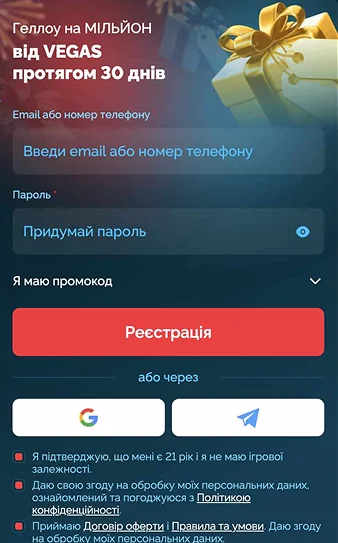
The Vegas Casino form is minimal: the operator does not ask you to fill in a questionnaire at the start. Personal details will be needed later, during verification.
- Click «Sign up» in the site header.
- Enter your e-mail or phone number.
- Create a password.
- Agree to the Terms and Conditions, and the account is ready.
Instead of the form, you can choose a social network icon and follow the prompts. An important rule: one account per person. If your old account will not open, signing up again will only complicate matters; the operator asks you to contact the online chat.
Vegas Casino login on the website
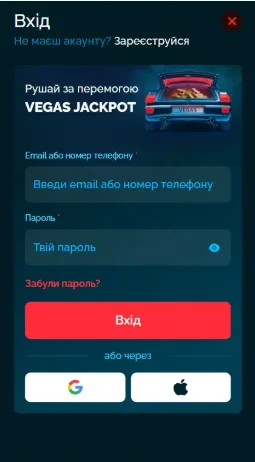
The «Log in» button is in the top menu next to sign-up. In the window, enter the e-mail or phone number given at sign-up and your password. After logging in, the balance and the «Deposit» button appear in the header.
The app uses the same username and password: there is no need to sign up separately on your phone. On Android, as the operator itself points out, after installation you simply tap the icon on the home screen and enter your details as on the website.
Verification (KYC) via Diia
Under the licence rules, initial identification takes place before you start playing, so without it you cannot place your first bet. The operator offers two methods.
- Diia: a quick check via the app; after confirming, click «Done» on the website.
- Documents: a photo or scan of an identity document uploaded to the «Verification» section of your profile.
Later on, the operator is obliged to update the data within the time limits set by law, so it may ask for updated documents. This is a standard requirement for a legal casino, not a sign of a problem with the account.
Card confirmation
You can only deposit and withdraw with cards issued in your name. To confirm this, the operator asks for a screenshot showing both the card digits and the owner's surname.
| Bank | Where to get the screenshot |
|---|---|
| PrivatBank | Privat24 → card → gear icon → «Card details» |
| Monobank | swipe left → «Send card statement» |
| Other bank | card details in online banking |
The screenshot is uploaded to the same «Verification» section. Example: if you topped up your account with 1,500 ₴ using a Monobank card, winnings can only be withdrawn to that card, so it is best to confirm that particular card straight after the first deposit.
Vegas casino personal account
All profile settings at Vegas UA open from the menu via the gear icon next to the account ID. This is also where you confirm your e-mail and phone: enter the details, click «Confirm» and follow the link in the e-mail or enter the 4-digit code from the SMS.
- Cashier: deposit and «Withdraw» tabs.
- Bonuses: active offers and the wagering progress bar.
- VIP profile: level, XP, V-Coin and «Shop».
- Verification: KYC status and uploaded documents.
If the confirmation e-mail has not arrived, check the «Spam», «Social» and «Promotions» folders. If they are empty too, the support chat will confirm your contacts manually.
Recovering and changing your password
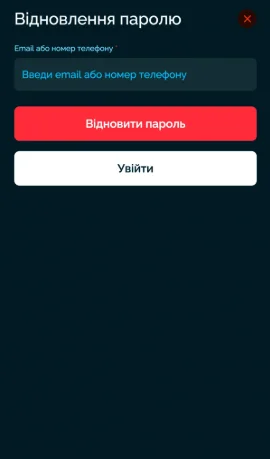
If you have forgotten your password, click «Log in», choose «Forgot password?», enter your e-mail or phone and click «Recover password». The system will then guide you through setting a new one.
- Open the menu and tap the gear icon next to the ID.
- Go to the «Password» tab.
- Enter the old password, then the new one twice.
- Click «Save».
You cannot change the phone number or e-mail address yourself: only support in the online chat does this, after verifying your identity.
If Vegas UA login does not work
When Vegas Casino will not let you into your account, the cause is most often the browser: the cache or extensions interfere with authorisation. The operator advises trying «Incognito» mode first.
| Situation | What to do |
|---|---|
| The website opens but login fails | «Incognito» mode |
| Forgotten password | «Forgot password?» in the login window |
| No access to the old number | online chat |
| The game does not start after login | update the browser, clear the cache, turn off the VPN |
Example: a player logs in from a work laptop where a corporate extension blocks cookies; in an «Incognito» window the same password works straight away. If even that does not help, the chat works 24/7.
Bonuses that unlock after the first deposit are covered in the article Vegas Casino promo code.
Installation on a phone is described in the article Vegas Casino app.
The licence, cashier and VIP club are described in the review Vegas Casino online. Our rules are in the rules section, and help is on the responsible gaming page.
Frequently asked questions
Can you play at Vegas Casino without verification?
No. Identification is completed before the first bet: the operator only allows verified customers over 21 to play.
What to log in with: phone or e-mail?
Either of them, if it is listed in the account. The password is the same on the website and in the app.
What if the SMS with the code does not arrive?
Check the number and wait a few minutes. If the code still has not arrived, the online chat will help confirm your phone.
Can I create a second account?
No, only one account per person is allowed. If you have lost access, write to support.
How do I change the phone number in my account?
Only via the online chat: you cannot change your phone or e-mail in the profile yourself.